
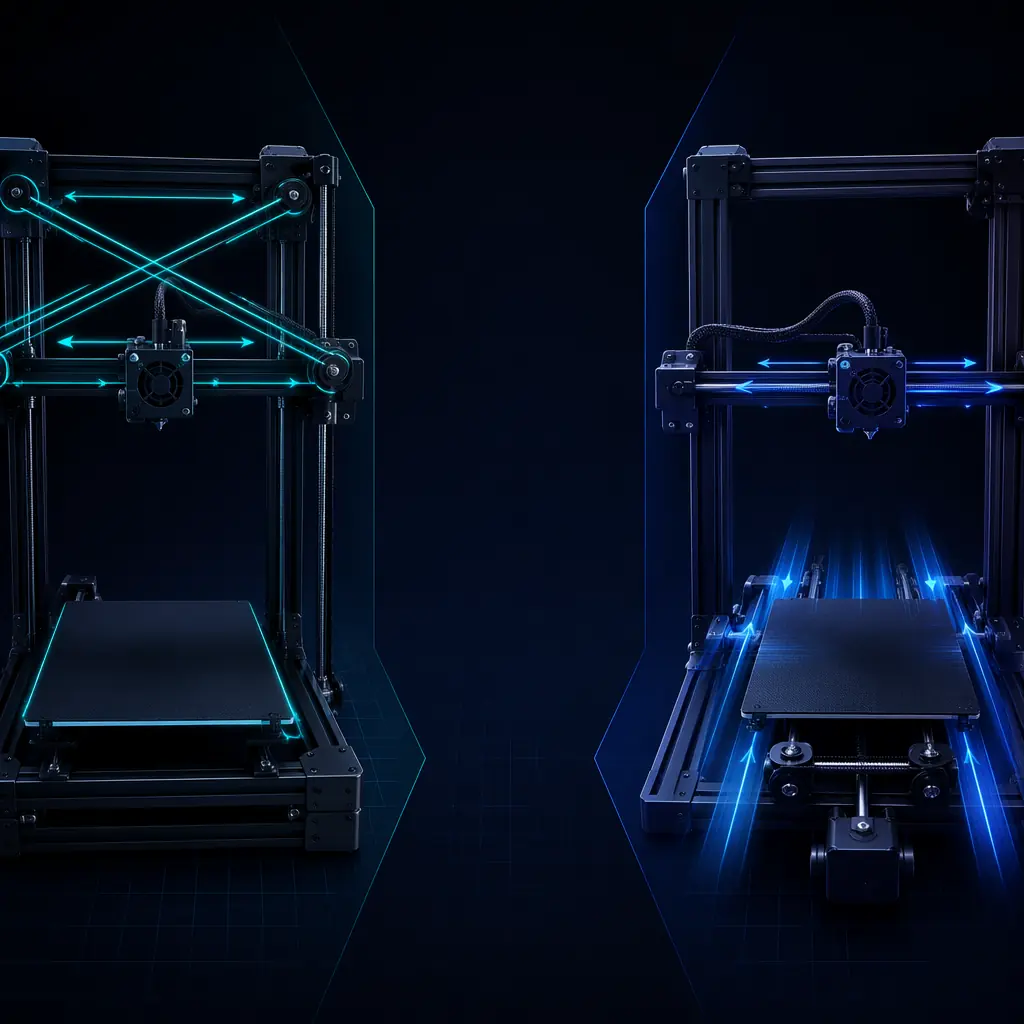
Walk into any 3D printer trade show in 2026 and you'll notice the industry has quietly split into two camps. On one side: the CoreXY printers — enclosed, fast, expensive, the machines that print a sub-15-minute Benchy. On the other: the bedslingers — open, affordable, the printers that move the entire build plate back and forth with every layer and somehow still outsell everything else 3:1. Both architectures produce perfectly good prints. But they serve fundamentally different customers, and stocking the wrong mix is the fastest way to watch inventory collect dust while your competitor sells out.
This guide breaks down the physics, the economics, and the customer-segment mapping so you can build a product line where every SKU earns its shelf space.
How Each Architecture Actually Works
In a bedslinger (technically: Cartesian moving-bed), the print head moves left-to-right on the X axis, and the entire heated bed moves forward and backward on the Y axis. The Z axis raises the gantry vertically. This is the design used by the Precise3D Creator C1 and Start S1 — it's the dominant architecture in the sub-$400 segment for a reason: it's mechanically simple, cheap to manufacture, and easy to calibrate. The tradeoff is physics. A 220×220mm glass bed with a print on it weighs 1–2 kg. Accelerating that mass to 180 mm/s, stopping it, reversing direction — that's the limiting factor on speed and the source of visible ringing artifacts at higher speeds.
A CoreXY printer keeps the bed stationary (it only moves down on Z) and uses a belt-driven XY gantry to move the print head in both horizontal axes. Two stepper motors — positioned at fixed points on the frame — drive a crossed belt system where both motors run together for X movement, in opposite directions for Y movement, and at different speeds for diagonals. The Pro X1 uses this architecture. The benefit: the moving mass is just the print head assembly (~300–400g including hotend, fans, and probe), not the entire bed. This is why CoreXY printers hit 500 mm/s while bedslingers top out around 180–300 mm/s.
The Numbers: Speed, Precision, and Ringing
Let's put actual numbers on the comparison. In our in-house testing lab at the Shenzhen facility, we ran identical 150mm calibration cubes on the Pro X1 (CoreXY, 500 mm/s max) and the Creator C1 (bedslinger, 300 mm/s max). Both machines were tuned with input shaping enabled, using the same 0.4mm nozzle and PLA filament at 210°C.
Speed benchmarks:
The Pro X1 completed the cube in 18 minutes 12 seconds at 300 mm/s with 5,000 mm/s² acceleration. The Creator C1 needed 28 minutes 45 seconds at its maximum 300 mm/s with 2,500 mm/s² acceleration — the bed mass limits usable acceleration, so it rarely sustains its theoretical top speed. The difference compounds on larger prints: a 200mm vase that takes 3.2 hours on the Pro X1 takes 5.1 hours on the Creator C1 — a 59% time penalty.
Surface quality:
At 180 mm/s, both machines produce indistinguishable surface finish. At 300 mm/s, the CoreXY shows faint vertical fine-lines on the Y face (belt tension artifacts) while the bedslinger shows visible ringing on the X face where the bed's momentum overshoots direction changes. At 500 mm/s, the Pro X1 still produces dimensionally accurate parts — the bedslinger physically cannot reach that speed.
Dimensional accuracy:
Across 10 cubes each, the Pro X1 averaged ±0.08mm deviation on X and Y axes; the Creator C1 averaged ±0.12mm. Both are within the ±0.2mm tolerance that most customers consider "good" — but the CoreXY's consistency makes it the choice for functional parts that mate with other components.
What This Means for Your Customer Segments
The architectural choice maps directly to three distinct buyer personas. Getting this mapping right is the difference between a customer who becomes a repeat buyer and one who returns the printer because "it's too slow" or "it's too complicated."
Hobbyist / First-time buyer (bedslinger, sub-$300):
This customer wants to unbox, level the bed in 10 minutes, and print a dinosaur for their kid. They don't know what input shaping is and don't care. The Start S1's manual-assist auto bed leveling and simple UI are exactly what they need — and the bedslinger architecture keeps the retail price where it needs to be. As explored in our OEM partner evaluation guide, the entry-tier printer is often the gateway to a long-term distributor relationship.
Enthusiast / prosumer (bedslinger or CoreXY, $300–$600):
This is the fastest-growing segment and the one where the architecture decision gets interesting. A well-tuned bedslinger like the Creator C1 with silent drivers under 45dB handles PLA, PETG, and TPU beautifully — and the open-frame design keeps maintenance trivial. But a growing share of this segment has started printing ABS, ASA, and Nylon, which require an enclosure and the temperature stability that CoreXY's stationary bed naturally provides. The trend line points toward CoreXY capturing this tier by 2027.
Print farm / small business (CoreXY, $600+):
This customer measures printer performance in revenue per machine-hour. The Pro X1's 500 mm/s speed and 300×300×350mm build volume translate directly to throughput. A print farm running 10 Pro X1 units at 85% utilization produces roughly 2.4× the output of the same number of bedslingers — and the fully enclosed chamber with HEPA filtration means they can run ABS and Nylon jobs that bedslinger farms can't touch. Our print farm economics breakdown covers the unit economics in depth.
Cost Structure: Why the Price Gap Exists
A CoreXY printer costs 40–60% more to manufacture than an equivalent-class bedslinger, and it's not because of brand markup — it's physics and parts count. Let's break it down.
Frame rigidity requirements:
A bedslinger's frame needs to be stiff enough that the bed doesn't wobble at 180 mm/s. An aluminum extrusion frame with plastic corner brackets meets that bar at a component cost around $18–25. A CoreXY frame must remain rigid under the belt tension of a crossed gantry system pulling at 10,000+ mm/s² acceleration — which demands thicker extrusions, metal corner brackets, and often a fully boxed design, pushing frame cost to $40–60.
Motion system components:
A bedslinger uses 3 stepper motors (X, Y, Z), 3 belt loops, and linear rods or V-slot wheels. A CoreXY uses 4 motors (two for XY, two for Z — dual Z is standard to prevent gantry sag on larger builds), a precision belt-routing system with idler pulleys at every corner, and linear rails instead of V-wheels for the speeds involved. The component count is roughly 40% higher.
Assembly labor:
CoreXY belt routing is a 15–20 minute manual operation even for experienced technicians — the belts must be tensioned evenly on both sides or the gantry racks. Bedslinger assembly is a 5-minute bolt-together job. This labor delta alone adds $8–12 to factory cost per unit at Shenzhen rates.
These costs are real and unavoidable. A $199 CoreXY printer doesn't exist for good reason. But as discussed in our multi-color printing analysis, the mid-range segment is where margins live — and CoreXY is the architecture that justifies the mid-range price point.
The Stocking Mix Formula
Based on sales data across our distributor network of 200+ partners in 50+ countries, here's the product mix that maximizes revenue per square foot of shelf space:
60% bedslinger (entry): One or two SKUs at the sub-$300 price point. These are your volume drivers — they move fast, generate foot traffic (physical or digital), and create the customer base that upgrades later. Stock the Creator C1 as the premium bedslinger option with silent drivers and Wi-Fi, and the Start S1 as the price-leader.
30% CoreXY (mid-range): One SKU at the $500–700 price point. This is your margin engine. The Pro X1's CoreXY architecture, full enclosure, and 500 mm/s speed justify the price premium — and the per-unit margin is typically 2–3× what you make on an entry-level bedslinger.
10% CoreXY (professional): If you're serving print farms or engineering labs, add a second CoreXY SKU with larger build volume (350mm+) and higher-temperature capabilities. This is a lower-volume, higher-margin play that signals technical credibility to your entire customer base. Our engineering filaments guide covers the material ecosystem that makes this tier profitable.
The Convergence Point
The line between CoreXY and bedslinger is blurring. Three developments are worth watching:
First, input shaping on bedslingers has gotten remarkably good. With accelerometer-based resonance compensation, a well-tuned bedslinger at 250 mm/s can produce prints that look indistinguishable from a CoreXY at the same speed. The gap on surface quality is closing; the gap on raw throughput (where CoreXY's higher acceleration dominates) remains wide.
Second, bedslinger enclosures are becoming common. Third-party enclosure kits for popular bedslinger models sell for $40–60 and provide the temperature stability needed for ABS and ASA. They don't match the thermal consistency of a factory-enclosed CoreXY with a chamber heater, but for occasional engineering-filament use, they're adequate. As covered in our FDM vs resin comparison, material versatility is increasingly the deciding factor for distribution portfolios.
Third, CoreXY costs are coming down. Belt-routing automation, stamped metal idler assemblies replacing CNC-machined parts, and higher-volume motor production are pushing CoreXY bill-of-materials toward bedslinger territory. We project a $299 CoreXY printer is technically feasible by Q4 2027 — and when that happens, the bedslinger's cost advantage collapses.
Decision Framework: Which Architecture for Which SKU
Boil it down to four questions. If the answer to any of the first three is "yes," you need a CoreXY in the lineup:
1. Does this SKU target customers printing functional parts (brackets, enclosures, mechanical components that must fit together)? → Yes = CoreXY. The dimensional consistency matters when parts must mate.
2. Will this SKU be used with engineering filaments (ABS, ASA, Nylon, PC, carbon-fiber composites) that require chamber temperatures above 45°C? → Yes = CoreXY. The fully enclosed chamber with active heating is non-negotiable here.
3. Is this SKU being sold into a print-farm or production environment where machine-hour throughput determines ROI? → Yes = CoreXY. The speed differential compounds into real money at scale.
4. Is this SKU the customer's first 3D printer with a budget under $300? → Yes = bedslinger. Don't over-engineer the entry point. A customer who can't afford the printer never becomes a customer at all.
At Precise3D, we build both architectures because both matter. The Pro X1's CoreXY kinematics and the Creator C1's bedslinger design aren't competing — they're complementary. The right question isn't "which is better?" It's "which customer are you stocking for?"
Reviewed by the Precise3D engineering & OEM team. Compliance files that accompany the catalog are auditable at the certification register.
Start Your Partnership
Ready to Bring corexy bedslinger kinematics to Your Market?
Start with the corexy bedslinger kinematics spec sheet, then validate every claim against the certification register.
