
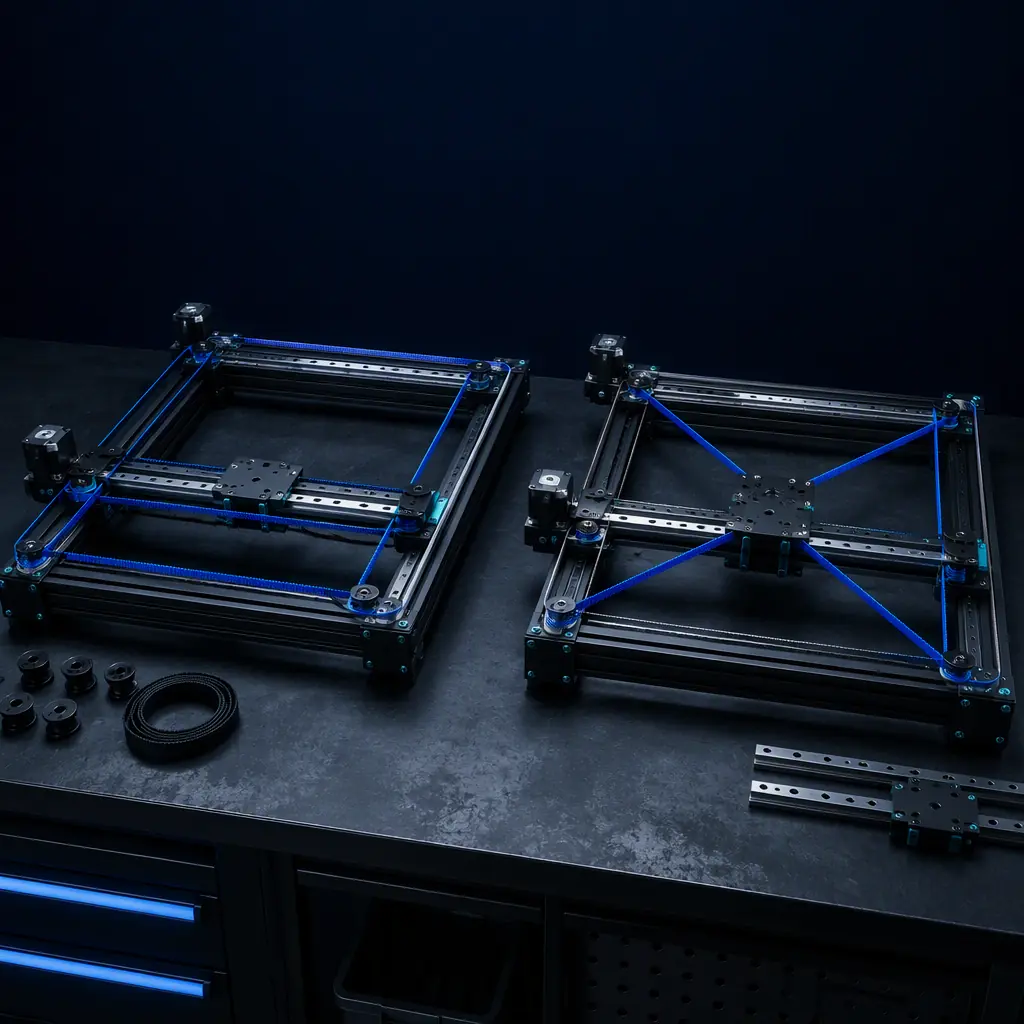
Walk through any 3D printer trade show in 2026 and you'll see the same pattern: budget machines ($150–400) often use H-Bot kinematics, while mid-range to premium machines ($500+) almost universally use CoreXY. The two systems look similar at a glance — both keep the motors stationary on the frame while the gantry moves the print head in X and Y — but the belt routing difference between them creates a racking force problem that fundamentally separates the two kinematics classes in terms of print quality, speed ceiling, and long-term reliability.
For distributors building a product portfolio across price tiers, understanding H-Bot vs CoreXY isn't academic. It directly impacts which machines you carry at each price point, what return rates to expect, and how to explain the value proposition to customers comparing a $299 H-Bot printer against a $599 CoreXY machine.
How H-Bot and CoreXY Actually Differ — The Belt Routing
Both systems use two stepper motors mounted on the frame and two continuous belts that move the gantry. But the belt paths diverge in a way that creates fundamentally different mechanical behavior:
CoreXY:
The belts cross each other at the gantry. Motor A's belt runs from the motor pulley, around an idler, to one side of the gantry, then crosses the gantry to an idler on the opposite side before returning. Motor B's belt follows a mirrored path. The crossing creates a balanced force couple — when both motors rotate together, the gantry moves in X. When they rotate in opposite directions, it moves in Y. The crossing ensures that belt tension forces cancel each other's moments on the gantry.
H-Bot:
The belts do NOT cross. One belt forms an "H" shape connecting the motors to the gantry. Motor A drives the left side, Motor B drives the right side — but both belts are parallel (not crossed). This is simpler to assemble and uses slightly less belt length, but it creates an unbalanced moment on the gantry during diagonal moves.
That $3–5 cost saving is the entire economic rationale for H-Bot. It's not about performance — it's about hitting a lower BOM cost for the sub-$300 price segment. For context on how motion components impact overall printer quality, see our CoreXY vs bedslinger kinematics comparison.
The Racking Problem — Why H-Bot Falls Apart at Speed
H-Bot's defining weakness is a phenomenon called racking force. During a pure diagonal move (X and Y axes moving simultaneously), the belt tension forces in an H-Bot system create an unbalanced moment that tries to rotate the gantry around its vertical axis. The force magnitude scales with acceleration, which means H-Bot printers suffer disproportionately at higher speeds.
Here's the math: on a 300 mm gantry with belt tension of 30 N, a diagonal move at 8,000 mm/s² acceleration generates approximately 12–18 N of racking force — enough to deflect a typical aluminum extrusion gantry by 0.05–0.15 mm. At 60 mm/s print speed, this shows up as slight dimensional inaccuracy on diagonal walls. At 200 mm/s, it manifests as visible layer misalignment.
This is why H-Bot machines that print beautifully at 60 mm/s produce visibly worse results at 150 mm/s — the racking force grows with the square of acceleration, and the effect crosses the visible threshold somewhere between 5,000 and 8,000 mm/s² on most budget frames.
What you're looking for: If print quality degrades on diagonal moves but not on pure X or Y moves, and the degradation increases with speed, the root cause is racking. This is the definitive H-Bot signature.
Print Quality Comparison — By Speed and Geometry
Here's what distributors should expect at each speed tier, based on benchmark testing across H-Bot and CoreXY machines in the $200–800 range:
For distributors, the practical implication is clear: H-Bot is acceptable for machines marketed at ≤80 mm/s print speeds (entry-level, education, hobbyist). As soon as you market a machine as "high-speed" (≥120 mm/s), you need CoreXY — or you'll face a wave of print quality complaints driven by racking, not by any defect in the individual machine. Our high-speed printing guide covers the full requirements for speed marketing.
Real-World Market Examples — Which Printers Use Which Kinematics
The market has already voted. Here's where H-Bot and CoreXY appear in 2026:
H-Bot machines (budget segment):
- Two Trees Sapphire series ($200–350) — classic H-Bot design, acceptable quality at ≤80 mm/s
- Some Wanhao Duplicator i3 variants — used H-Bot for cost reduction in the $250–400 range
- Various unbranded AliExpress printers — H-Bot is the dominant kinematics for sub-$200 CoreXY-style machines
CoreXY machines (mid-range to premium):
- Bambu Lab X1/P1 series — CoreXY with input shaping, 200–300 mm/s practical speed
- Creality K1/K2 series — CoreXY, 200–300 mm/s
- Voron 2.4/Trident — the original open-source CoreXY reference design
- RatRig V-Core 4 — premium CoreXY with Hiwin rails (see our RatRig ecosystem guide)
- Prusa XL — CoreXY with toolchanger, ~200 mm/s
Notice that every printer marketed above $500 uses CoreXY. This isn't branding — it's physics. The racking force limitation makes H-Bot unsuitable for the speed and quality expectations of the mid-range market. For a broader comparison of printer categories, see our 2026 buyer's guide by price tier.
Portfolio Strategy — Where to Place H-Bot vs CoreXY
For distributors building a multi-tier product line, the H-Bot vs CoreXY decision maps cleanly to price segments:
The takeaway: if you're carrying only one CoreXY-style kinematics in your portfolio, it must be CoreXY — not H-Bot. The $3–5 cost saving per machine is outweighed by higher support costs (racking-related quality complaints), higher return rates (customers who expected "fast" printing), and weaker competitive positioning against the Creality K1 and Bambu A1 at the value tier. For more on product positioning, see our distributor portfolio strategy guide.
H-Bot's Legitimate Use Cases — Where It Still Makes Sense
This guide isn't arguing that H-Bot has no place. It has three legitimate niches in 2026:
1. Ultra-budget education printers ($150–250): Schools buying 20+ machines for introductory 3D printing classes don't need 200 mm/s speed. They need reliable, simple machines. H-Bot at 60 mm/s with a 0.6 mm nozzle delivers exactly this — and at a price point ($199 per unit in volume) that makes lab-wide deployment feasible.
2. Large-format slow printers (400+ mm): The racking force problem is proportional to gantry width. But on a large-format machine (500+ mm) printing with a 1.0 mm nozzle at 30–50 mm/s, the acceleration is low enough that racking never becomes significant. In this niche, H-Bot's slightly simpler belt routing and lower belt stretch (shorter paths) can actually be an advantage.
3. Laser engraver conversions: Many low-cost laser engravers use H-Bot kinematics because the gantry carries a lightweight laser module (not a heavy extruder + hotend), and engraving speeds are typically 100–200 mm/s with near-zero acceleration forces. The racking problem doesn't manifest. If you're stocking a dual-purpose engraver/printer, H-Bot can work for the laser side.
Reviewed by the Precise3D engineering & OEM team. Compliance files that accompany the catalog are auditable at the certification register.
Build Your Product Line
Carry CoreXY Printers Engineered for Speed Without Compromise
Every Precise3D CoreXY printer ships with factory-tuned belt tension, input shaping calibrated, and 0.9° stepper motors — delivering clean prints at 200+ mm/s out of the box. Request our distributor package for full specifications, volume pricing, and sample unit availability.
