
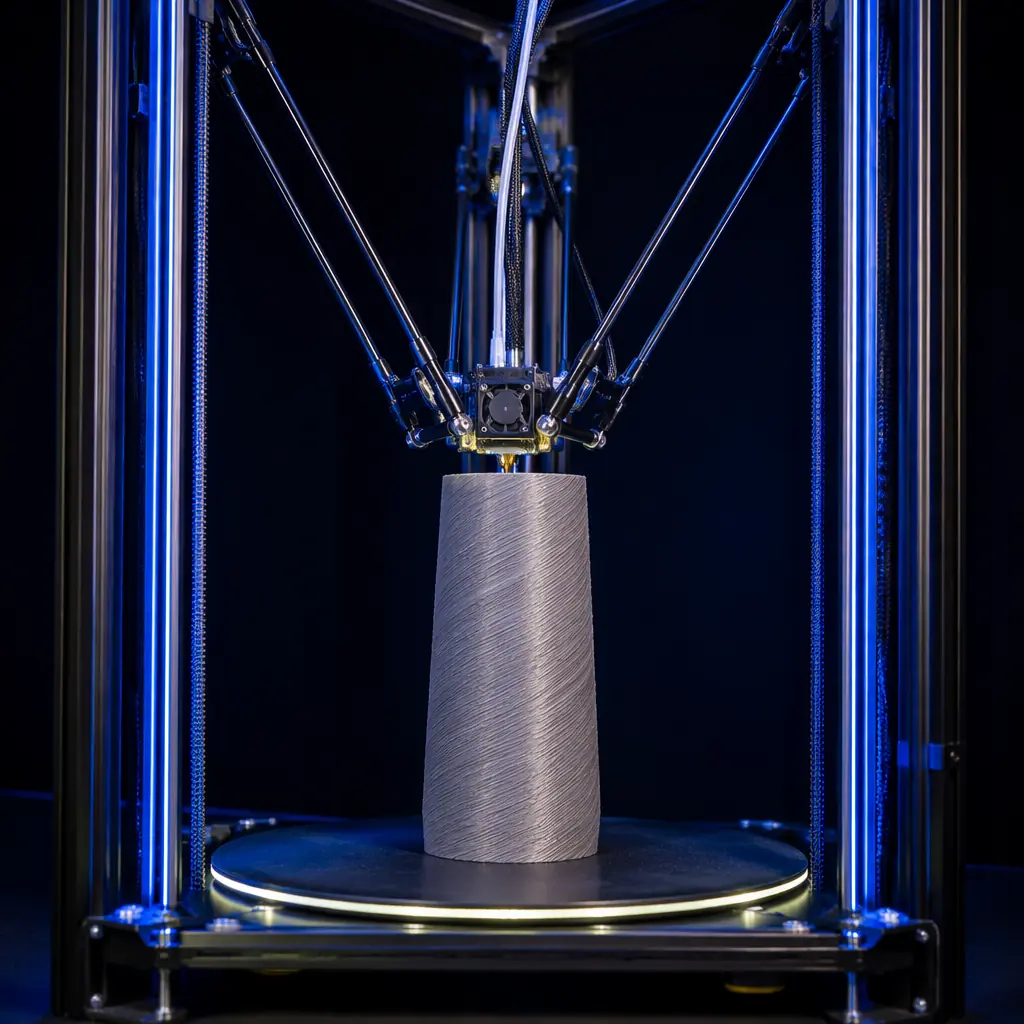
Walk into a makerspace and you'll see a delta printer before you hear it — or maybe because you don't hear it. Three tall aluminum extrusions form a triangular frame, an effector platform suspended by six arms dances above the build plate, and the whole machine moves at speeds that make a Cartesian bedslinger look stationary. A delta printer running at 300 mm/s looks physically impossible the first time you see it. It's not. Delta kinematics represent the most mechanically efficient motion system in consumer 3D printing — and for a specific, commercially significant set of applications, they are the only correct answer. Understanding those applications, and the customers who have them, is the difference between a delta SKU that collects dust and one that sells at premium margin.
The delta architecture has been around since the earliest days of RepRap — the Rostock design debuted in 2012 — but it has spent most of its commercial life as a niche curiosity. That changed with the rise of 32-bit firmware (Klipper, specifically) and the mainstreaming of high-speed printing. Delta printers benefit from fast compute more than any other kinematics type because the trigonometric calculations for inverse kinematics — translating Cartesian X/Y/Z coordinates into three linear carriage positions — are substantially more complex than the simple linear math of a Cartesian machine. An 8-bit Arduino running Marlin struggles to keep up above 80 mm/s on a delta. A 32-bit STM32 running Klipper at 150K steps per second barely breaks a sweat at 400 mm/s. The hardware bottleneck that held delta back for a decade evaporated, and now the question is not "can a delta print fast" but "which customers actually need the speed, and who will be frustrated by the tradeoffs." This guide answers both questions with data distributors can use to make stocking decisions.
How Delta Kinematics Actually Work (Without the Math)
There are three kinematics architectures in mainstream consumer 3D printing, and each one moves the toolhead in a fundamentally different way. Understanding the mechanical difference is essential to understanding the commercial difference.
Cartesian (bedslinger):
The most common architecture. The print head moves in X and Z; the bed moves in Y. Simple, cheap, intuitive. The bed is the heaviest moving mass, which creates inertial artifacts (ringing) at higher speeds. This is the architecture covered in our CoreXY vs bedslinger comparison guide — read it if you haven't already, because everything in this article builds on the kinematics fundamentals established there.
CoreXY:
Both X and Y motors are stationary on the frame. A single continuous belt in an H-pattern moves the toolhead in both axes simultaneously. The bed moves only in Z. The stationary motors reduce moving mass dramatically, enabling higher speeds with less ringing. CoreXY is the current sweet spot for consumer printers in the $199–799 range.
Delta:
Three vertical linear rails — arranged in an equilateral triangle — each carry a motor-driven carriage. Six arms (two per carriage) connect the carriages to a single effector platform that holds the hotend. The toolhead has no X/Y/Z motors of its own; instead, the three carriages move in coordinated vertical motion, and the inverse kinematics math converts desired X/Y/Z toolhead positions into the corresponding carriage heights. The result: the toolhead is the lightest moving mass of any FDM architecture. No heavy bed moves in X or Y. No heavy extruder motor rides on the gantry. The effector carries the hotend, a part-cooling fan, and a Bowden tube — total moving mass under 100 grams in a well-designed delta. A typical bedslinger's Y-axis moves a 2–3 kg heated bed assembly. A delta's effector weighs less than the stepper motor that drives a bedslinger's Y-axis.
That mass difference is everything. Acceleration is force divided by mass. When the moving mass drops by a factor of 20–30, the achievable acceleration — and therefore the maximum print speed before ringing becomes visible — increases proportionally. A delta printer with well-tuned kinematics can hit 20,000 mm/s² acceleration on travel moves. A bedslinger is doing well at 2,000 mm/s². A CoreXY might reach 8,000–10,000 mm/s² with a lightweight toolhead and input shaping. The delta's mechanical advantage is not incremental — it's a step change.
The numbers tell the story: a delta printer's toolhead can accelerate roughly 10x faster than a bedslinger's Y-axis and 2–3x faster than a CoreXY gantry. But raw speed is only one part of the value proposition — and it's not even the most commercially important one.
The Tall-Part Sweet Spot: When Build Height Is the Limiting Factor
Every FDM printer has a build volume spec: X × Y × Z. For bedslingers and CoreXY machines, increasing Z height is mechanically cheap — you just make the lead screws longer. But increasing Z beyond 300–350 mm introduces a problem: the taller the print, the higher the center of gravity of the part on the moving bed, and the more lever arm the bed's motion applies to the part. A 350mm-tall print on a bedslinger will visibly oscillate at the top layers because the bed's Y-axis movement sways the entire assembly. CoreXY fixes the bed motion problem, but a 400mm-tall CoreXY printer needs a frame tall enough that frame rigidity becomes the limiting factor — and frame rigidity scales with the cube of height, so going from 300mm to 500mm Z requires a disproportionately heavier frame.
Delta printers invert this equation. The bed is stationary — bolted to the base of the machine. The print doesn't move at all. The carriages travel up and down, and the print grows upward from a fixed, rigid surface. This means Z-height is limited only by the length of the vertical rails and the rigidity of the three corner towers. A delta printer with 400mm of vertical rail is mechanically simpler than a CoreXY with 400mm of Z screw — and substantially more rigid at that height. For a full treatment of how build volume affects customer buying decisions, see our build volume selection guide for distributors.
The commercial implication: any customer who regularly prints tall, narrow parts — vases, figurines, cosplay props, architectural models, lamp shades, rocket nose cones — is a candidate for a delta printer. These parts have a high Z-to-XY ratio. On a bedslinger, they wobble. On a CoreXY, they need careful support and slow print speeds at height. On a delta, they print as stably at layer 800 as they do at layer 1. This is not a marginal improvement — for a customer whose business depends on printing 300mm+ tall parts reliably, it is the difference between a viable production workflow and a machine they can't use for their primary application.
What Delta Printers Don't Do Well (and Why That Matters for Sales)
Selling a product means knowing its weaknesses as well as its strengths. A delta printer has three significant limitations that disqualify it for certain customer segments — and a distributor who ignores these will generate returns.
1. XY build area is circular, not rectangular. The print volume of a delta printer is a cylinder — the build plate is round, and the usable diameter is typically 70–80% of the machine's stated diameter due to the kinematics constraints at the edges. A "300mm delta" might have a usable print diameter of 220–240mm. A customer who needs to print rectangular parts that fill a standard 220×220mm build plate will find the delta's usable area frustratingly small. This is the number-one reason delta printers get returned: the customer expected 300×300mm and got a 240mm-diameter circle.
2. First-layer calibration is harder. A Cartesian printer has three independent axes — you level the bed by adjusting four screws, and the Z offset is set once. A delta printer requires calibration of six variables: the endstop positions of all three carriages, the delta radius (arm length), and the tower angle offsets. If any one of these is off by even 0.5mm, the effector will not move in a true flat plane — it will print in a shallow bowl or dome shape, producing failed first layers at the edges of the build plate. Auto bed leveling helps, but delta ABL probes a grid of points and computes a correction mesh, which adds 2–3 minutes to every print start. For a customer who values plug-and-play simplicity — the kind of customer who buys a Prusa MK4 — a delta printer's calibration routine is a dealbreaker. For guidance on auto bed leveling technology across architectures, refer to our auto bed leveling guide.
3. Bowden extrusion is mandatory, which limits flexible filament compatibility. A direct-drive extruder — where the extruder motor rides on the toolhead — adds roughly 160–220 grams to the moving mass. On a delta, that defeats the entire mechanical advantage. Every production delta printer uses a Bowden setup: the extruder motor is mounted on the top frame or base, feeding filament through a PTFE tube to the hotend. This is fine for rigid filaments (PLA, PETG, ABS) and works acceptably with medium-flexibility materials (TPU 95A) if the Bowden tube is short and tight-tolerance. It does not work with very soft flexibles (TPU 85A and below) — the filament compresses inside the Bowden tube like a spring, making retraction and extrusion control unreliable. A customer who wants to print NinjaFlex or ultra-soft TPU on a delta will have a bad experience. If flexible filament compatibility is a priority for your customer base, refer to our direct drive vs Bowden guide for the tradeoff analysis.
Customer Profiles: Who Actually Buys a Delta 3D Printer
After 12 years of delta printers on the market, clear customer profiles have emerged. These are not theoretical — they're based on what actual buyers self-report after purchase, and the data clusters into four distinct groups. A distributor who stocks a delta printer should be able to identify which of these profiles their territory is rich in.
Cosplay and prop makers are the delta printer's natural demographic. Their parts are tall (helmets, shoulder armor, staff components), often printed in vase mode for speed, and benefit enormously from the stationary build plate. A helmet that takes 22 hours on a bedslinger at 60 mm/s can print in 12 hours on a delta at 120 mm/s with less risk of layer shift at the top. These customers are also the most tolerant of calibration complexity — cosplay building already involves multiple complex tools (sewing machines, foam cutting, airbrush painting) and the calibration learning curve is not a barrier for this group.
Vase and art printers represent a smaller but higher-margin segment. A ceramic-style vase printed in wood-fill PLA on a delta printer is a premium product — and the delta's ability to print tall, thin-walled objects in spiral vase mode at high speed makes it the ideal production tool. These customers typically find deltas through YouTube and Instagram, not comparison shopping, and they are willing to pay a premium for a machine purpose-built for their workflow.
Print farm operators are the wild card. Most print farms standardize on a single printer model for interchangeable parts, uniform maintenance, and bulk purchasing. A delta printer on a farm of bedslingers breaks that uniformity. But for a farm that specializes in a specific tall-part product — chess sets, lithophane lamps, cosplay armor pieces — adding a small fleet of delta printers (3–5 units) dedicated to that product line can dramatically improve throughput. The math is straightforward: if 40% of the farm's orders are for parts over 200mm tall, and the delta prints those parts 40% faster than the farm's standard machine, then 3 delta printers can replace 5 standard printers for that workload. The economics work — but only for farms that have already identified their product mix and know the tall-part percentage. For a deeper look at print farm economics including throughput calculations, see our print farm economics guide.
Educators and makerspaces buy delta printers for one reason above all others: they look incredible in operation. Students gather around a running delta printer in a way they never do around an Ender 3. The visual spectacle has genuine educational value — it makes 3D printing tangible and exciting in a way that a moving box with a nozzle inside doesn't. But educators are the highest-support-cost customer segment for deltas because the calibration gets knocked out of alignment by curious hands, and the teaching staff rarely has the technical depth to recalibrate. A distributor selling deltas to schools should bundle a calibration service visit or a detailed video calibration guide as part of the sale.
General hobbyists should not be sold a delta printer. They want a machine that works out of the box, prints a Benchy in 45 minutes, and handles whatever random STL they download from Thingiverse. A delta printer is the wrong tool for this job, and selling one to a general hobbyist will generate a return, a bad review, or both. The qualifying question is simple: "What's the tallest thing you plan to print regularly?" If the answer is under 150mm, recommend a bedslinger or CoreXY. If it's over 250mm and the parts are relatively narrow, the delta conversation begins.
Delta vs CoreXY at the Same Price Point: A Feature-by-Feature Breakdown
At the $399–599 price point — the range where serious hobbyist machines live — a distributor can choose between a competent CoreXY printer and a competent delta printer. They are not interchangeable. The feature comparison below is based on what a customer actually experiences, not spec sheet bullet points.
The takeaway: at the same price, a delta wins on speed, tall parts, and visual impact. A CoreXY wins on usable area, ease of use, flexible filaments, and enclosure support. They serve different customers. A distributor who stocks a delta should also stock a CoreXY at the same price point — the two machines don't compete; they complement. The customer who needs a square 220×220mm build area and direct-drive TPU printing was never going to buy the delta anyway. The customer who needs to print 350mm vases at speed was never going to buy the CoreXY. For a broader look at how motion systems interact with print quality across architectures, see our motion system comparison.
After-Sale Considerations: Delta Maintenance and Support
Delta printers require a different support profile than Cartesian machines. Distributors who understand this can price their support correctly and avoid margin erosion from unexpected service costs.
The six-arm parallelogram is a wear item.
Each arm has two ball joints — one at the carriage, one at the effector — for a total of 12 joints. These joints use either magnetic ball-and-socket connections or trapped-ball rod ends. Over 500–1,000 hours of printing, the ball joints develop play: the tolerance opens from ~0.02mm to ~0.1mm, and the effector starts to exhibit slight positional inaccuracy. Symptoms: inconsistent first layers at the build plate edges, subtle banding on tall prints. The fix is an arm replacement kit (6 arms, ~$25–35) and a 15-minute recalibration. Distributors should stock arm kits as a consumable and proactively offer replacement at the 800-hour mark.
Belt tensioning is more critical on deltas than any other kinematics type.
A delta printer has three independent Z belts — one per tower — and these three belts must maintain identical tension. If one belt stretches or loosens, that tower's carriage lags behind the others, and the effector tilts. The result looks like a skewed print, but it's actually inconsistent Z positioning across the three towers. The diagnostic test: print a large single-layer square and measure the thickness at each of the three corners nearest the towers. If the thickness varies by more than 0.05mm, one or more belts need tensioning. For distributors, this means the delta service guide must include a belt tensioning procedure with measurable tension specs (typically 4–6 lb deflection force at mid-span). For context on how motor and driver systems interface with belt-driven motion, refer to our stepper driver selection guide.
The hotend is uniquely exposed.
On a Cartesian or CoreXY printer, the hotend is buried inside a toolhead assembly with a part-cooling fan duct and a shroud. On a delta, the effector is a minimalist platform — the hotend hangs below it with minimal surrounding structure. This makes nozzle changes faster (great for maintenance) but also exposes the hotend to impact damage if the effector crashes into a curled-up print edge. A delta printer should ship with a spare hotend and a spare thermistor — and the distributor should stock these as first-tier spare parts.
Support cost summary: a delta printer generates roughly 30–40% more support tickets in its first year of ownership than a comparable CoreXY printer, and the tickets are disproportionately calibration-related (60%+ vs ~20% for CoreXY). However, the ticket volume drops sharply after month 3 — delta owners who make it through the calibration learning curve become self-sufficient and rarely need support afterward. The support profile is front-loaded, and distributors should price extended warranties accordingly (higher first-year premium, lower renewal rate after year 1). For a comprehensive look at building a support infrastructure, our after-sales support strategy guide covers warranty structures in detail.
Stocking Strategy: How Many Delta Units for a Balanced Portfolio
The delta printer is not a volume SKU. It is a specialist tool for specific customer segments, and the stocking math reflects that. Based on distributor sales data across the consumer 3D printing market, here is a rational stocking framework for a distributor carrying 4–8 printer models:
The delta SKU should represent roughly 10–15% of total inventory units. It will not generate 10–15% of revenue — it will likely generate 8–12% — but it serves a strategic purpose beyond direct revenue. The delta printer is the machine that stops people at trade show booths. It is the YouTube thumbnail machine. It is the conversation starter that gets a potential distributor's foot in the door with a cosplay community, an art school, or a makerspace. Stock it as a marketing asset that also generates sales, not as a pure revenue play. For guidance on structuring your full product portfolio by market segment, see our portfolio strategy guide.
At Precise3D, our approach to delta kinematics reflects this philosophy: we do not currently offer a delta model in the standard product line because our core market — distributors serving education, prototyping, and general manufacturing — is better served by CoreXY and bedslinger architectures. But we track delta technology closely, and we evaluate every new motion system on one criterion: does it solve a real customer problem that our current lineup doesn't? The delta architecture solves the tall-part speed problem definitively — and if our distributor network signals sufficient demand in the cosplay, vase-printing, or tall-part production segments, a Precise3D delta printer is on the roadmap. In the meantime, every Precise3D printer in the current lineup — from the entry-level Creator C1 to the professional Pro X1 — incorporates lessons from delta kinematics development: lightweight toolhead design, rigid frame construction, and firmware-optimized motion planning that extracts maximum speed from whatever architecture it runs on. The high-speed printing technology guide covers the firmware advances (input shaping, pressure advance) that make these speed gains possible across all architectures.
Bottom Line
The delta printer occupies a specific, defensible, and commercially valuable niche in the consumer 3D printing market. It is not a general-purpose machine. It is not a first-printer recommendation. It is not a volume SKU. But for the customers who need it — the cosplay builders printing helmets at 200% scale, the vase artists producing 350mm decorative pieces, the print farms specializing in tall-part production — a delta printer is not just the best choice; it is often the only choice that works reliably. A distributor who understands which of their territory's customer segments map to the delta profile, and who stocks a small fleet (5–10 units) with complete spare parts support, can capture a premium-margin niche that Cartesian-only competitors cannot touch. The delta is not a mass-market product. It is a precision tool for a precision audience. Stock accordingly.
Reviewed by the Precise3D engineering & OEM team. Compliance files that accompany the catalog are auditable at the certification register.
Start Your Partnership
Ready to Bring delta kinematics to Your Market?
Our OEM program supports delta kinematics programs end to end - the product line, firmware and compliance files that travel with each shipment.
